KPF Pipeline
Overview:
The KPFPipeline is a mechanism conforming to the Pipeline definitions of the W.M. Keck Observatories’ Keck Data Reduction Pipeline Framework (KeckDRPFramework). However, it uses the Framework mechanisms in a novel way to provide needed additional flexibility through the use of “recipes”. In the Framework, the focus is to enqueue and run a sequence of data reduction “primitives”. The Framework accomplishes this through event queues (two of them, with differing priorities) and the event_table. The event_table provides a mechanism to map a primitive definition into actual python code in a module.
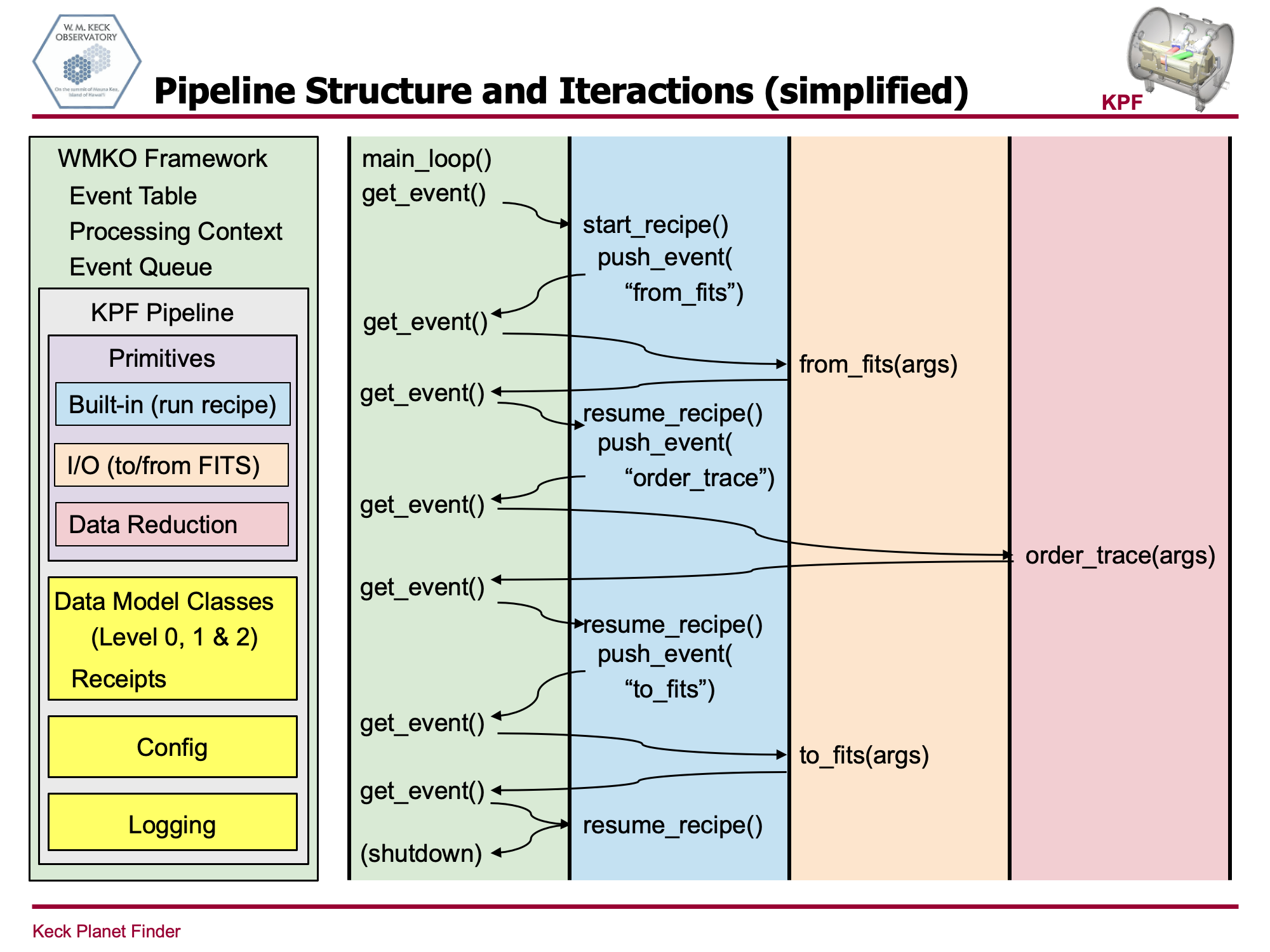
In order to support recipes with the flexibility to do conditional processing and loops, the KPFPipeline implements two special primities, “start_recipe” and “resume_recipe”. “start_recipe” is always the first primitive run by the framework. It parses the recipe file into an Abstract Syntax Tree (AST), and walks through the nodes of the tree, which are syntax elements of the recipe, acting appropriately on each node in turn. When the AST walk hits a “call” node that references an actual data processing primitive, it enqueues the primitive as the next event, and returns from “start_recipe”. The KPFPipeline uses the Framework’s “next_event” mechanism when it enqueues the primitive to ensure that the Framework runs “resume_recipe” immediately after each data reduction primitive. “resume_recipe” continues walking the AST nodes tree, picking up at the “call” node that triggered the running of the data reduction primitive, including handling return values from that primitive.
In addition to “start_recipe” and “resume_recipe”, the KPFPipeline prepopulates the event table with primitives to write and read FITS files. These are “to_fits”, “kpf0_from_fits”, “kpf1_from_fits” and “kpf2_from_fits”. Other built-in functions that are available for use within recipes without external calls to the Framework are discussed in register_recipe_builtins() below.
Here is an example recipe to illustrate how the pipeline and recipe mechanism works:
from modules.order_trace.src.order_trace import OrderTrace

test_data_dir = KPFPIPE_TEST_DATA + '/KPFdata'
data_type = config.ARGUMENT.data_type
output_dir = config.ARGUMENT.output_dir
input_flat_pattern = config.ARGUMENT.input_flat_file_pattern
flat_stem_suffix = config.ARGUMENT.output_flat_suffix

order_trace_flat_pattern = test_data_dir + input_flat_pattern

for input_flat_file in find_files(order_trace_flat_pattern):
    _, short_flat_file = split(input_flat_file)
    flat_stem, flat_ext = splitext(short_flat_file)
    output_lev0_file = output_dir + flat_stem + flat_stem_suffix + flat_ext
    if not find_files(output_lev0_file):
        flat_data = kpf0_from_fits(input_flat_file, data_type=data_type)
        ot_data = OrderTrace(flat_data)
        result = to_fits(ot_data, output_lev0_file)
In the above recipe, notice that there are three primitives that need to be run by the Framework, kpf0_from_fits (which reads a FITS file), OrderTrace and to_fits (which writes a FITS file). Only OrderTrace needs to appear on a from … import line, since the other two are provided by the pipeline.
The next five lines of the recipe define parameters, by referencing the KPFPIPE_TEST_DATA environment variable, and by accessing the config. The “for” loop uses several built-in functions, including find_files, split and splitext, which are defined elsewhere.
The last three lines of the recipe to the actual data reduction work, reading a FITS file into a variable called “flat_data”, calling the OrderTrace module, which returns its results into the variable “ot_data”, which is then written into a FITS file with a filename derived from the input name. In a more complete recipe, ot_data would be used as an input argument to another data reduction processing step.
The following diagram shows the flow of the code between the Framework proper, the KPFPipeline recipe support mechanisms and the data reduction primitives for the above recipe. Calls to the built-in functions such as find_files(), int() and str() are handled directly within start_recipe and resume_recipe, and so don’t appear in the diagram. In the diagram, “kpf_from_fits” is called “from_fits” for simplicity.
The following table is the formal specification of the recipe grammar. It is a subset of the grammar of the Python programming language, but it needs to be understood that a recipe is not Python code. Rather, it is a specification of what processing the pipeline should do, expressed in a way that is similar to Python.
Supported Recipe Syntax Elements:
mod = Module(stmt* body, type_ignore* type_ignores)

stmt = FunctionDef(identifier name, arguments args,
                stmt* body, expr* decorator_list, expr? returns,
                string? type_comment)
                        string? type_comment)

    | Assign(expr* targets, expr value, string? type_comment)

    -- use 'orelse' because else is a keyword
    | For(expr target, expr iter, stmt* body, stmt* orelse, string? type_comment)
    | If(expr test, stmt* body, stmt* orelse)

    | ImportFrom(identifier? module, alias* names, int? level)

    | Expr(expr value)

    -- col_offset is the byte offset in the utf8 string the parser uses
    attributes (int lineno, int col_offset, int? end_lineno, int? end_col_offset)

expr = BinOp(expr left, operator op, expr right)
    | UnaryOp(unaryop op, expr operand)
    -- need sequences for compare to distinguish between
    -- x < 4 < 3 and (x < 4) < 3
    | Compare(expr left, cmpop* ops, expr* comparators)
    | Call(expr func, expr* args, keyword* keywords)
    | Constant(constant value, string? kind)

    -- the following expression can appear in assignment context
    | Attribute(expr value, identifier attr, expr_context ctx)
    | Subscript(expr value, expr slice, expr_context ctx)
    | Name(identifier id, expr_context ctx)
    | List(expr* elts, expr_context ctx)
    | Tuple(expr* elts, expr_context ctx)

operator = Add | Sub | Mult | Div | And | Or

unaryop = Not | UAdd | USub

cmpop = Eq | NotEq | Lt | LtE | Gt | GtE | Is | IsNot | In | NotIn

arguments = (arg* posonlyargs, arg* args, arg? vararg, arg* kwonlyargs,
            expr* kw_defaults, arg? kwarg, expr* defaults)

arg = (identifier arg, expr? annotation, string? type_comment)
    attributes (int lineno, int col_offset, int? end_lineno, int? end_col_offset)

-- keyword arguments supplied to call (NULL identifier for **kwargs)
keyword = (identifier? arg, expr value)
        attributes (int lineno, int col_offset, int? end_lineno, int? end_col_offset)

-- import name with optional 'as' alias.
alias = (identifier name, identifier? asname)
- class kpfpipe.pipelines.kpfpipeline.KPFPipeline(context: ProcessingContext)[source]
Pipeline to Process KPF data using the KeckDRPFramework
- Parameters:
context (ProcessingContext) – context class provided by the framework
- event_table
Values are tuples, e.g. “action_name: (name_of_callable, current_state, next_event_name)”
- Type:
dictionary
- exit_loop(action, context)[source]
Force the Keck DRP Framework to exit the infinite loop
- Parameters:
action (keckdrpframework.models.action.Action) – Keck DRPF Action object
context (keckdrpframework.models.ProcessingContext.ProcessingContext) – Keck DRPF ProcessingContext object
- name = 'KPF-Pipe'
table of actions known to framework. All primitives must be registered here. Data reduction primitives are registered into the event_table as part of the processing of the “from … import” statement at the top of a recipe.
- The format of entries is:
action_name: (name_of_callable, current_state, next_event_name)
- Type:
event_table (dictionary)
- register_recipe_builtins()[source]
register_recipe_builtins() registers some built-in functions for the recipe to use without having to invoke them through the Framework’s queue. If additional built-in functions are needed, this is the place to add them.
The supported built-ins are:
- int:
Same behavior as in Python
- float:
Same behavior as in Python
- str:
Same behavior as in Python
- len:
Same behavior as in Python
- find_files:
Same behavior as glob.glob in Python, which returns a list of files that match the string pattern given as its argument. In particular, * expansion is supported.
- split:
Same behavior as os.path.split in Python. It returns two strings, the first representing the directories of a file path, and the second representing the simple file name within the directory.
- split_ext:
Same behavior as os.path.splitext in Python. It returns two strings, the second being the file extension of a file path, including the dot, and the first being everything else.
- dirname:
Same behavior as os.path.dirname. It returns the directory portion of a file path, excluding the file name itself, with no trailing separator.
- exists:
Same behavior as os.path.exists() It returns True if the file or directory exists at the specified path.
- print:
Similar behavior to print(), but it only accepts one argument and the output is through logger.info(). f-strings are supported.
- resume_recipe(action: Action, context: ProcessingContext)[source]
Continues evaluating the recipe started in start_recipe(). resume_recipe() will run immediately after each data processing primitive, and makes return values from the previous primitive, stored in an Arguments class instance in action.args, available back to the recipe.
- Parameters:
action (keckdrpframework.models.action.Action) – Keck DRPF Action object
context (keckdrpframework.models.ProcessingContext.ProcessingContext) – Keck DRPF ProcessingContext object
- start(configfile: str) None[source]
Initialize the customized pipeline. Customized in that it sets up logger and configurations differently from how the BasePipeline does.
- Parameters:
config (ConfigParser) – containing pipeline configuration
- start_recipe(action, context)[source]
Starts evaluating the recipe file (Python syntax) specified in context.config.run.recipe. All actions are executed consecutively in the Framework’s high priority queue.
Before starting processing the recipe, built-in functions available to recipes without having to enqueue them to the Framework are registered, and values defined in the environment are imported so that they are also available to recipes.
- Parameters:
action (keckdrpframework.models.action.Action) – Keck DRPF Action object
context (keckdrpframework.models.ProcessingContext.ProcessingContext) – Keck DRPF ProcessingContext object